Select text anywhere, press a shortcut, and let responsible use of AI take it from there.
Looking up a definition, translating a phrase, or getting writing help usually means copying text, switching apps, and pasting it in. AI Hotkeys+ collapses that into a single keyboard shortcut, from inside whatever program you're already using.
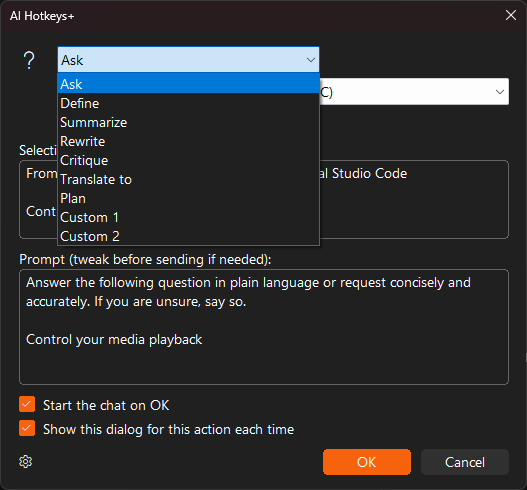
Choose a private, on-device AI with Ctrl+Win+Alt+L, or your preferred cloud AI with Ctrl+Win+Alt+A, followed by a number key for one of nine actions - Ask, Define, Summarize, Rewrite, Critique, Translate, Plan, and two fully custom slots you define yourself.
Need step-by-step help? See the full AI Hotkeys+ guide →
Ctrl+Win+Alt+L runs a private, on-device AI action that never leaves your PC; Ctrl+Win+Alt+A sends your selection to your preferred cloud AI instead.
Each local and cloud group has nine customizable slots: seven preset actions (Ask, Define, Summarize, Rewrite, Critique, Translate and Plan) and two slots for your own actions.
The direct-download edition guides you through installing Ollama and a model. In the Microsoft Store edition, install Ollama yourself first. Initial engine and model downloads require an internet connection; local analysis runs on your PC.
By default, a confirmation dialog shows your selected text and chosen action before starting. You can switch actions or cancel. The dialog can be disabled for individual actions.
Free 30-day trial, no account or credit card needed. Then one payment for every feature — no subscription.
