Paste clean text anywhere, or paste your clipboard into a folder as a file.
Plain Paste pastes the text you copied and nothing else. No fonts, colors or sizes from the web page or document you copied it from. Press Ctrl+Shift+V in virtually any Windows app.
Paste as turns whatever's on your clipboard into a file in the folder you're in. Right-click inside a folder, or press Ctrl+Alt+V in File Explorer, and save a copied image as PNG, JPG, Bitmap or Icon, or save text and links as a URL shortcut with a QR code, HTML, Markdown or plain text file.
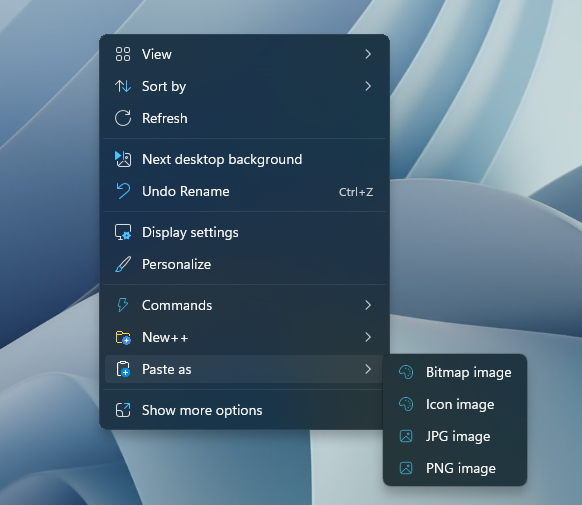
Plain Paste works across virtually any Windows application, so you never have to clean up formatting by hand again. Paste as works from the right-click menu in any folder and on the desktop.
Need step-by-step help? See the full Paste+ guide →
Copy as usual, then press Ctrl+Shift+V instead of Ctrl+V. Plain Paste inserts only the text.
Copy or take the screenshot, then right-click an empty spot in a folder and choose Paste as, or press Ctrl+Alt+V in File Explorer, and pick PNG or JPG.
Yes. Paste as can create a URL shortcut, with an optional QR code, or a file shortcut from copied text or links.
Yes. Open Settings and go to Paste+ to change or turn off the Plain Paste and Paste as shortcuts.
Free 30-day trial, no account or credit card needed. Then one payment for every feature — no subscription.
